
Made withHyperblog

Product Documentation Template for SaaS: Setup, Tasks, and Troubleshooting

How to Write a SaaS User Guide: Examples and a Review Checklist

How to Reduce Support Tickets With Better SaaS Documentation
A useful product changelog tells a customer what changed, who is affected, what action to take, and where to learn more. It should help someone decide whether to try a feature, update a workflow, prepare for a breaking change, or ignore an update that does not affect them. A chronological list of shipped work cannot do that by itself.
For SaaS teams, the strongest entries connect release evidence to customer decisions. Product managers define the audience and impact. Engineering verifies behavior, availability, and technical constraints. Documentation or product marketing rewrites internal language for customers. Support checks the questions users are likely to ask. One accountable owner then approves the entry and its linked documentation before publication.
Use the workflow below for feature launches, behavior changes, deprecations, fixes, and security-related notices. It keeps each entry concise while preserving the details users need to act.
A product changelog is a curated record of notable customer-facing changes. Keep a Changelog defines a changelog as a chronologically ordered list of notable changes for each version, and emphasizes that it is written for people. That principle matters for SaaS products because an internal ticket, pull request, or commit message describes implementation work rather than the customer’s decision.
Every entry should answer four questions quickly: What changed? Who is affected? What should they do? Where can they verify the details? If one answer is missing, users may know that a release happened without understanding its consequence.
The changelog also needs a boundary. It should summarize the customer-facing change and point to the canonical setup guide, API reference, migration instructions, or policy page. It should not become a second copy of the full documentation. Duplicate instructions become difficult to maintain when the product changes again.
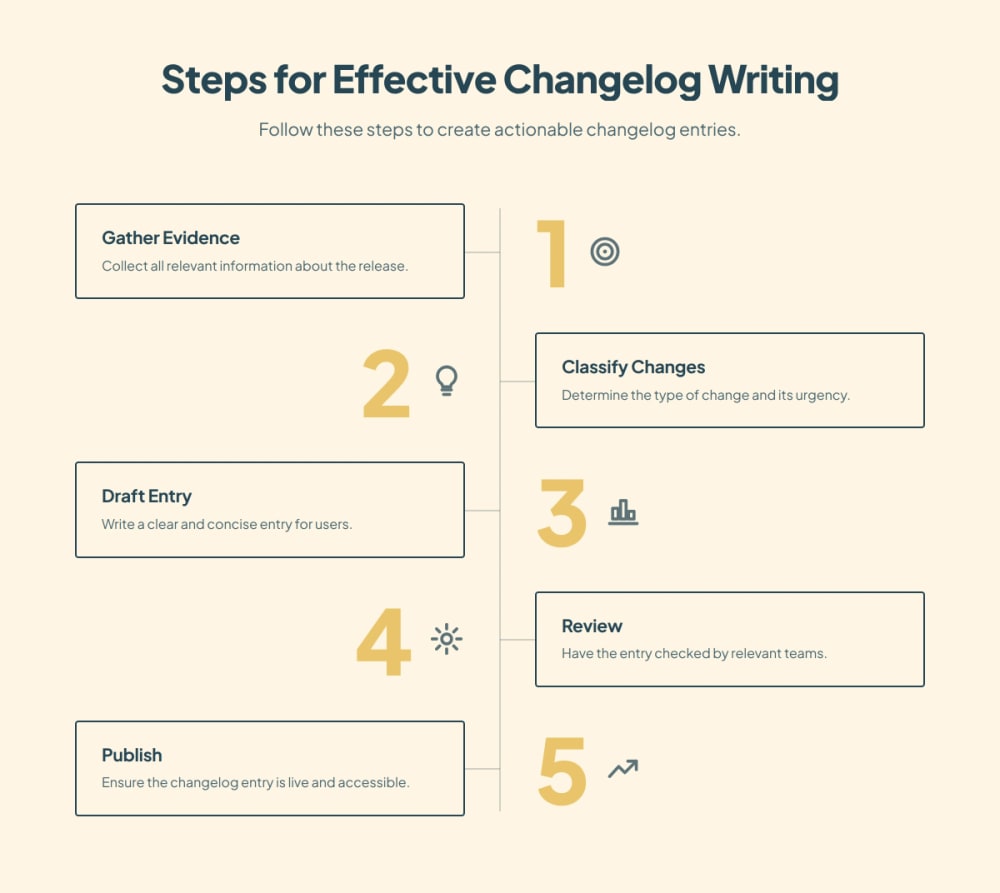
Strong changelog writing begins before the writing step. Require a small evidence packet for every proposed entry. The packet should identify the release owner, affected users, availability conditions, verified behavior, required action, related documentation, and approval status.
At minimum, collect the internal issue or pull request, the release or deployment record, the user-facing feature name, plan and permission requirements, rollout scope, screenshots when relevant, known limitations, and the destination documentation. Treat this packet as source material. Do not copy its internal wording directly into the public entry.
The evidence packet prevents common accuracy failures. A feature may be merged but unavailable to customers. A setting may exist only for administrators. An API change may affect one version or authentication method. A UI label may have changed after the draft was written. Each of these details changes the action a user should take.
Classification determines the urgency, structure, reviewer, and call to action. A practical taxonomy includes new feature, improvement, behavior change, deprecation, removal, fix, and security update. Keep a Changelog uses comparable categories such as Added, Changed, Deprecated, Removed, Fixed, and Security.
New features usually need a clear use case and a first step. Improvements need the previous limitation and the practical difference. Behavior changes need affected workflows and the date or version where the behavior applies. Deprecations and removals need a migration path, deadline, and alternative. Fixes need the corrected behavior and any action required to recover. Security updates need careful disclosure, upgrade instructions, and review by the appropriate security owner.
If your product uses Semantic Versioning, version numbers can also communicate compatibility. SemVer reserves major-version changes for incompatible public API changes. Still, a version number is only a signal. Users need plain-language impact, scope, and migration guidance.
Name the outcome or affected workflow. “Bulk export is available for audit logs” is clearer than “Export service refactor completed.” Include the object the user recognizes, such as audit logs, workspace roles, API tokens, or translated articles.
Open with the verified behavior that is now available or different. Avoid launch language that hides the substance. A reader should understand the change without opening another page.
Specify the role, plan, permission, region, platform, API version, or rollout cohort when it matters. “Workspace administrators on the Scale plan” is actionable. “Users can now” may be inaccurate when access is limited.
Connect the feature or fix to a real task. Describe the decision or workflow it supports without promising an outcome you cannot verify. For example, an export may make records easier to review outside the product. It does not guarantee compliance or faster audits.
Use one primary action. Tell the reader to enable a setting, review a permission, update an integration, migrate before a date, test a changed workflow, or read the setup instructions. If no action is required, say so plainly.
Point to the canonical page that owns configuration, reference details, limitations, and troubleshooting. Use descriptive anchor text. Update that documentation before or at the same time as the changelog entry so the destination supports the promised next step.
Breaking changes deserve a distinct publishing path. Put the impact before the feature explanation. Name the affected version, endpoint, field, permission, or workflow. Provide the old behavior, new behavior, migration steps, deadline, test method, and support route.
Research on release-note issues found that missing information, especially around breaking changes, was a recurring content problem. The same study also identified presentation, accessibility, and production failures. These findings support a controlled workflow that checks content completeness, placement, links, and publication ownership.
Do not hide a breaking change inside a general monthly roundup. Publish it early enough for customers to respond, link it from the affected documentation, and repeat the deadline through the communication channels your customers already use. The changelog remains the permanent record, while email or in-product notices can provide timely reach.
A changelog and product documentation serve different jobs. The changelog answers what changed and what the reader should do now. Documentation explains how the product works across the full task. Link the two so a customer can move from awareness to execution without searching.
Before publication, verify that every setup link, API reference, migration guide, and troubleshooting destination is live and current. If the release changes an existing workflow, update the canonical page rather than adding a second set of instructions to the changelog.
Hyperdocs includes changelog publishing alongside product documentation and help-center content. Teams can preview the customer-facing site before publishing, which provides a final check for formatting, links, and navigation context.
Help us understand how often you engage with changelogs.
How frequently do you read changelogs for product updates?
Review should match the risk of the change. Product verifies the customer problem, audience, positioning, availability, and rollout. Engineering verifies behavior, technical scope, version details, flags, and limitations. Documentation checks terminology, linked instructions, navigation, and reuse. Support checks likely failure cases and escalation guidance. Security reviews vulnerability language and disclosure timing when applicable.
Use a single approval field rather than scattered comments. Record who approved the entry, when they approved it, and which product build or documentation revision they reviewed. Reopen approval when the rollout, UI, API contract, permissions, or deadline changes after review.
The entry owner should run the final acceptance check in the rendered environment. Confirm the title, category, publication date, images, links, access requirements, mobile layout, and destination pages. Previewing matters because a structurally correct draft can still bury the action or send readers to an inaccessible page.
Page views alone do not show whether a changelog entry worked. Start with the action the entry requested, then measure evidence around that action. Useful signals may include clicks to the linked documentation, adoption of the announced setting, migration completion, repeated support questions, searches for the changed feature, and feedback on the entry.
Interpret these signals carefully. A low click rate may mean the entry answered the question on the page. It may also mean the action was unclear or the audience never saw the update. Compare the entry with similar change types and inspect qualitative feedback before changing the format.
Review missed questions with support and documentation owners. If users ask how to enable the feature, clarify the action and improve the setup page. If they ask whether they are affected, strengthen the audience and scope statement. If they cannot complete the workflow, fix the canonical documentation rather than expanding the changelog into a full guide.
1. Evidence is tied to the released behavior, rollout, and customer-facing name.
2. The change category matches its customer impact and review path.
3. The title names a recognizable outcome, feature, or affected workflow.
Include the verified change, affected audience, practical impact, required action, availability or version limits, and a link to the maintained documentation.
Product should verify audience and rollout, engineering should verify behavior and technical scope, documentation should check instructions and links, and support should review likely customer questions.
Use the shortest entry that still explains impact and action. Move setup details, reference material, and troubleshooting to the canonical documentation page.
Name the affected version or workflow, explain the old and new behavior, give a deadline, provide migration and test steps, and identify a support route.
A changelog records what changed and what users should do now. Product documentation explains the complete task and remains the canonical source for setup, reference, and troubleshooting.
Review clicks to linked documentation, adoption of the requested action, migration completion, repeated support questions, search behavior, and qualitative feedback in context.
4. The opening sentence states what changed without internal implementation language.
5. Audience, plan, permissions, platform, version, and rollout limits are explicit where relevant.
6. The entry gives one clear action or states that no action is required.
7. Breaking changes, deprecations, and removals include dates, migration steps, and test guidance.
8. Canonical documentation is updated, live, accessible, and linked with descriptive text.
9. Product and technical facts have the appropriate human approval.
10. The rendered entry has been checked for layout, links, images, and mobile readability.
The best product changelog entries are short because the workflow behind them is disciplined. They begin with verified release evidence, classify the change, state the affected audience, explain impact, provide one next action, and link to maintained documentation. Human review remains essential wherever a wrong detail could change access, compatibility, migration, or security decisions.
If your changelog is separated from the documentation workflow, start by adding the evidence packet and approval check to one release type. Once the team can publish accurate entries consistently, apply the same process to improvements, fixes, deprecations, and breaking changes.
Subscribe to Our Newsletter
Stay up to date with our latest news and updates.