
Made withHyperblog

Product Documentation Template for SaaS: Setup, Tasks, and Troubleshooting

How to Write a SaaS User Guide: Examples and a Review Checklist

How to Reduce Support Tickets With Better SaaS Documentation
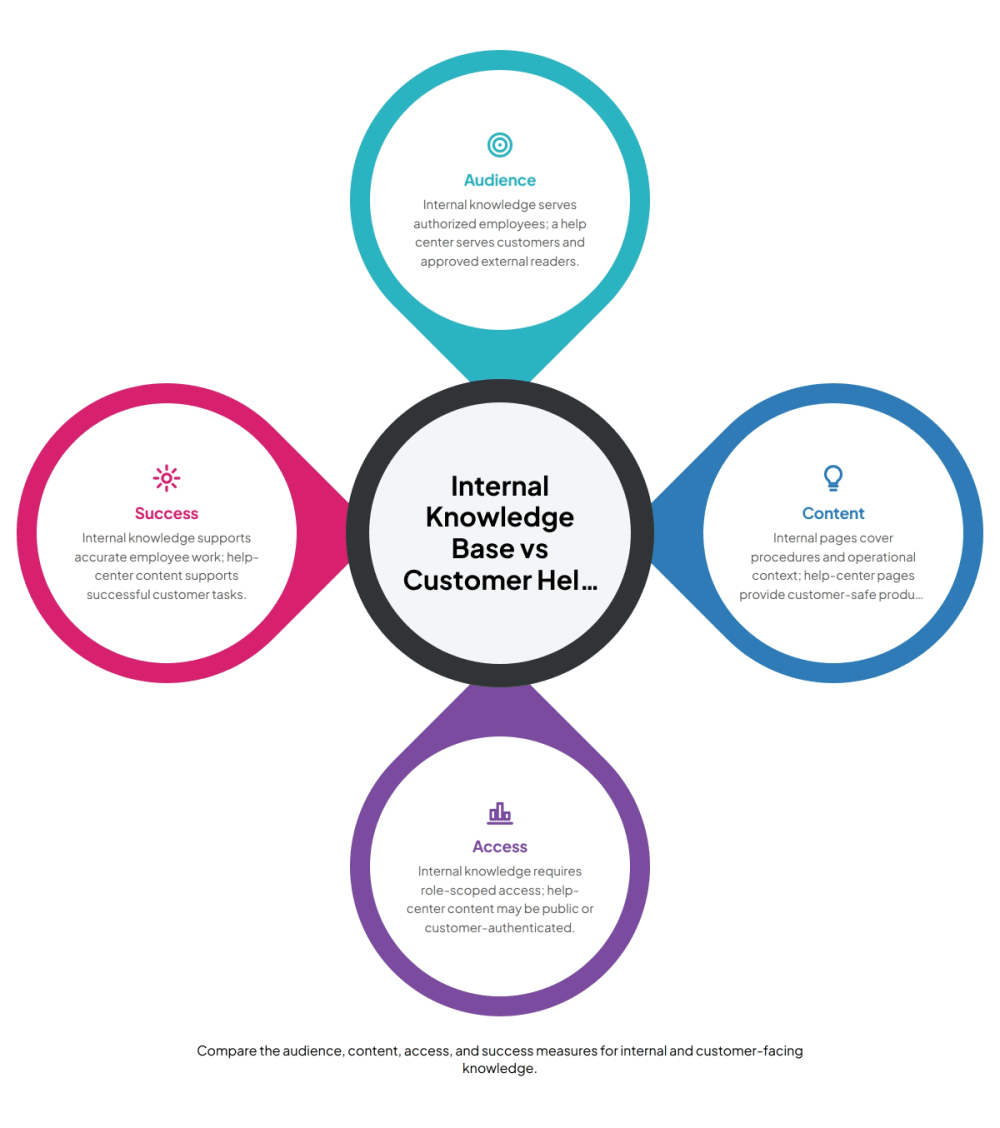
An internal knowledge base helps employees perform work, make decisions, and resolve customer issues. A customer help center helps customers understand and use a product without relying on an employee for every answer. The two systems may share source material, but they need different audiences, access rules, content standards, owners, and success measures.
For SaaS teams, the safest operating model is to define a clear publishing boundary. Internal articles can contain operational context, investigation steps, escalation paths, and role-specific procedures. Customer-facing articles should contain approved, public-safe guidance that a user can understand without access to internal systems. When the same fact is useful to both audiences, assign one authoritative source and create an audience-appropriate version rather than copying the same page into two unmanaged libraries.
The central distinction is the reader’s job. An employee opens an internal knowledge base to complete an organizational task, diagnose an issue, follow a policy, or understand why a decision was made. A customer opens a help center to set up the product, complete a workflow, understand a feature, or solve a problem.
Atlassian describes an internal knowledge base as agent-facing and an external knowledge base as customer-facing. Its guidance emphasizes separate access so teams can protect sensitive information while giving each audience the resources it needs.
Internal content serves employees, contractors, support agents, product teams, engineers, and other approved roles. Customer help content serves customers, prospects, partners, and sometimes authenticated account users. Naming the audience before writing prevents one article from assuming employee context while appearing in a public search result.
Internal knowledge usually includes standard operating procedures, incident runbooks, escalation criteria, support macros, decision records, investigation notes, product limitations, and ownership details. A help center usually includes onboarding, account setup, feature instructions, troubleshooting, billing guidance, FAQs, and customer-safe explanations of limits.
An internal knowledge base should use authenticated, role-scoped access. A customer help center may be public, restricted to signed-in customers, or divided between public and account-specific content. Public visibility is a publishing decision, not a default inherited from the authoring tool.
Internal knowledge is useful when employees can complete work accurately, reduce unnecessary escalation, and find current procedures. A help center is useful when customers can find the correct article, complete the intended task, and avoid submitting a request that the documentation should answer. Traffic alone does not prove either system is working.
Internal knowledge should capture the information employees need but customers should not be expected or allowed to use directly. The deciding test is whether the article depends on internal roles, systems, data, or judgment.
Document repeatable processes such as incident triage, account recovery approval, data correction, refund review, feature-flag checks, and escalation. State the trigger, required role, prerequisites, decision points, evidence to collect, and when the procedure must stop for specialist review.
Record why a policy, architecture choice, support exception, or product rule exists. Customer documentation usually needs the resulting rule. Employees may also need the constraints, tradeoffs, owner, and decision history so they do not reopen settled questions or apply an outdated exception.
Internal articles may reference diagnostic systems, nonpublic error patterns, account identifiers, security contacts, or recovery controls. These pages require careful classification. Sensitive data should not be added merely because the workspace is private. Include only what authorized readers need for the task.
Use internal pages for service-level expectations, approval paths, handoff checklists, and responsibility boundaries. An article should identify an accountable owner, required reviewers, and the event that triggers an update.
A customer help center should help an external reader act safely with approved information. It needs plain language, explicit prerequisites, task-based navigation, searchable terminology, and a maintained relationship with the product’s current behavior.
Explain the tasks customers perform, such as creating an account, configuring access, connecting an integration, or completing a core workflow. State the required plan, role, permissions, and expected result before presenting the steps.
Document symptoms users can recognize, checks they can perform, and recovery steps they are authorized to take. When a problem requires internal investigation, tell the customer what information to provide and how to contact support. Keep internal diagnostic commands and escalation logic in the internal knowledge base.
Publish clear guidance on supported behavior, limits, billing processes, data handling, and account responsibilities after the relevant product, legal, security, or finance review. Link to the governing public policy when a help article summarizes it.
Google Search states that pages must be publicly accessible and crawlable to be eligible for indexing. That distinction matters when a SaaS team expects public help content to be discoverable while keeping internal procedures out of search.
Let us know which resource you prefer for support.
What type of resource do you prefer for support?
Use a six-part routing test before assigning a page. First, identify the reader. Second, name the task. Third, list the information required to complete it. Fourth, classify the sensitivity of that information. Fifth, identify who can approve publication. Sixth, decide where the page will be maintained after the next product change.
The page assumes employee tools or training, contains escalation logic, reveals nonpublic product behavior, includes account-specific data, depends on judgment reserved for an internal role, or describes a procedure customers cannot perform.
The page helps customers complete an authorized task, explains approved product behavior, answers a recurring question with public-safe information, or provides troubleshooting that users can perform without privileged access.
Employees and customers need related information but at different depths. For example, a public article may explain how a user reports a failed integration. The internal companion can cover diagnostic logs, escalation thresholds, known defect references, and ownership. Link the internal page to the public article so agents can share the approved answer without copying text into a ticket.
Access design determines what writers can safely include. The NIST principle of least privilege limits access to what a user or process needs to perform assigned tasks. Apply that principle to internal knowledge by defining roles, limiting sensitive sections, reviewing permissions, and removing access when responsibilities change.
Do not rely on a page title, folder name, or an “internal” label as a security control. Test access with representative roles. Check direct links, search results, exports, AI-answer sources, integrations, and shared previews. A restricted article can still leak information if another system indexes or reproduces its content without the same authorization boundary.
Customer help centers also need access decisions. Some onboarding and troubleshooting pages should be public. Account-specific instructions may require authentication. Administrative or security-sensitive guidance may need restricted visibility even though it is written for customers.
One team can coordinate both systems, but ownership should not be vague. Assign an accountable editor for each content area and route factual approval to the team closest to the risk.
Operations or department leaders should own internal procedures. Engineering should review technical runbooks. Security and legal should review sensitive controls and regulated processes. Support should own case-handling procedures and escalation language. A documentation lead can maintain structure and editorial consistency without becoming the factual owner of every process.
Product should confirm intended behavior and availability. Engineering should validate technical instructions. Support should contribute customer language and repeated failure patterns. Documentation should own information architecture, clarity, and publishing quality. Security, legal, billing, or compliance reviewers should approve relevant pages.
The Hyperdocs documentation governance guide provides a practical model for defining page owners, reviewers, update triggers, and escalation paths across fast-moving SaaS teams.
Internal and external libraries often describe the same product behavior. The goal is consistency without forcing both audiences into one article.
Start with verified evidence such as current product behavior, an approved policy, API specification, release record, or tested support procedure. Mark which facts are public, customer-restricted, internal, or sensitive. Draft the customer help article from public-safe evidence. Draft the internal companion only when employees need additional context or actions.
During review, compare shared facts such as product names, limits, permissions, error conditions, and supported workflows. Choose a canonical owner for each fact that is likely to change. Link to that source where the audience has access. Record the product event, policy change, or support signal that should trigger review of both pages.
Microsoft’s knowledge-management guidance illustrates how agents can search relevant articles and share customer-appropriate links. The implementation details vary by platform, but the operating lesson is stable: employees need an internal working context and a controlled path to the approved customer answer.
An internal knowledge base helps authorized employees complete organizational work. A customer help center gives customers approved guidance for using a product, completing tasks, and solving common problems.
Yes, if it reliably separates audiences, permissions, search results, navigation, and connected-tool access. Teams should test those controls before storing sensitive internal procedures alongside customer-facing content.
Do not publish internal credentials, private account data, security-sensitive procedures, privileged diagnostic commands, nonpublic incident details, or escalation logic intended only for authorized employees.
Documentation for approved product behavior and customer tasks is usually customer-facing. Internal teams may need a linked companion page for operational context, diagnostics, ownership, or escalation steps.
Department leaders should own internal procedures, while product and documentation teams usually coordinate customer guidance. Engineering, support, security, legal, or billing reviewers should approve claims within their areas.
Assign a canonical owner for shared facts, link related pages, review both libraries when products or policies change, and use change events rather than fixed dates as the primary maintenance trigger.
A single platform can support internal and customer-facing knowledge when it has reliable audience separation, role-based permissions, search boundaries, draft and approval states, separate navigation, and clear controls over what connected tools can retrieve. Sharing infrastructure can reduce duplication, but only if the permission model is tested and understood.
Separate systems may be safer when internal procedures contain sensitive operational data, different teams administer access, compliance rules require distinct controls, or the public help center must prioritize discoverability and branded customer experience. Integration can still connect the systems through approved links and change notifications.
Hyperdocs is currently designed primarily for public-facing SaaS product documentation and customer help centers, not as a replacement for an internal wiki. Teams evaluating the customer-facing side can use its help-center workflow to organize approved product guidance, publish searchable articles, collect feedback, and connect help content with product documentation.
A correct separation can drift when products, policies, permissions, and support procedures change. Add knowledge review to release planning. Ask which customer articles change, which internal procedures change, and whether a shared fact now has two conflicting owners.
For the customer-facing library, test navigation, search terms, links, permissions, and task completion. The Hyperdocs guide to building a self-service help center provides a task-based approach to information architecture and maintenance.
For both libraries, schedule risk-based reviews and use change events as the primary trigger. Retire pages that no longer serve a current task, redirect public URLs where appropriate, and preserve internal decision history only when employees still need it.
An internal knowledge base and a customer help center are complementary systems. The internal library helps employees perform controlled work with organizational context. The help center helps customers complete approved product tasks with clear, findable guidance.
Define the audience, task, access level, factual owner, reviewer, and maintenance trigger before a page is written. Then link related internal and external pages without copying changing information into two unmanaged sources. That boundary gives employees the depth they need while protecting customers from internal complexity and protecting the organization from accidental disclosure.
Subscribe to Our Newsletter
Stay up to date with our latest news and updates.