
Made withHyperblog


Product Documentation Template for SaaS: Setup, Tasks, and Troubleshooting

How to Write a SaaS User Guide: Examples and a Review Checklist

How to Reduce Support Tickets With Better SaaS Documentation
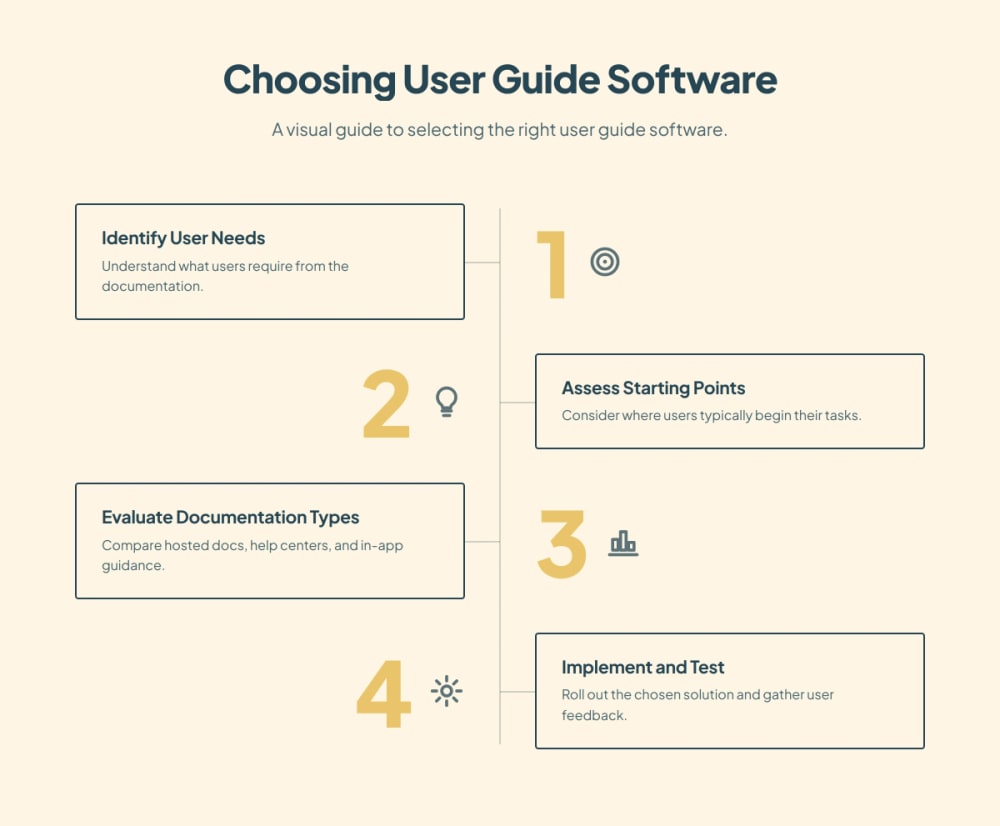
Choose hosted product documentation when customers need a guide they can open before signing in, share with a teammate, or revisit after setup. Choose a help center when they usually arrive with a symptom or a support question. Choose in-app guidance when someone is already at the right screen and needs a prompt to finish the next step. Many SaaS teams need a durable guide first, then one of the other surfaces where the task actually gets stuck.
Treat “user guide software” as a purchasing decision about where instructions should live. A new account owner learning how to invite a teammate, an employee looking up why an invitation failed, and a first-time admin staring at an empty members list can all need help with the same feature. Their starting points differ, and the software should account for that.
Surface | Best starting point | What to maintain | What to check first |
Hosted product docs | A customer needs the full task, prerequisites, or a shareable reference | One durable guide with steps, roles, and exceptions | Can the reader open a direct link with the right access? |
Hosted help center | A customer has a question, symptom, or error | Searchable answers and links to the governing guide | Does the article show up for the language customers use? |
In-app walkthrough | A signed-in customer needs help acting on a specific screen | Short prompts, eligibility rules, and a fallback | Can the right account see it without interrupting other users? |
A hosted guide usually has room for decisions that come before the clicks. Explain who can perform the task, what the reader needs ready, and how to recognize a successful result. A help center article can start closer to the failure: an invitation is pending, a button is missing, or a teammate used a different email. A walkthrough can point to the control while it is on screen.
Use the same description of the task across all three. If one surface says only owners can invite people and another says all admins can, the problem is ownership of the instructions. A new interface for the guidance will leave that inconsistency intact.
Consider an illustrative SaaS product that lets workspace owners invite teammates. This is a planning example, with invented product labels and no customer or test results. The team wants customers to get a colleague into the workspace and to recognize when access is active.
The hosted guide is the first layer. Give the owner a direct URL that an onboarding specialist can include in a welcome email. The guide should say which role can send invitations, where to find the Members screen, and what the Pending and Active states mean. If a customer will hand the task to a different owner, the same page should still make sense to that person.
Define how you'll handle private details. A public task guide might explain the process without revealing customer information. An account-specific instruction can require authentication. Try the destination as someone outside the company before using it in a customer email. If access fails at the moment of need, the person must ask support or find another way to finish setup.
Suppose the invite was sent but the teammate cannot join. Give the help center an answer titled “Invitation received, but I can't join the workspace.” Put the likely checks first: confirm the invited address, verify the invitation state, then explain who can resend or replace it. Point back to the canonical guide for the complete setup sequence.
Keep this answer distinct from the full guide. Support teams can own the symptom and escalation details while product or documentation owners maintain the invitation steps. Hyperdocs' help center editor documentation shows how to organize guides, categories, and quick links on that surface, then preview before publishing.
Build a Help Center
See how Hyperdocs brings customer guides and support answers together.
A short walkthrough can show eligible owners where to click the first time they reach Members. Set a sensible end condition, such as sending an invitation or dismissing the prompt. Give users a route back to the written guide if the button is missing or they need to understand permissions before proceeding.
Check empty and populated workspaces separately. A useful prompt in an empty members list may cover a critical control or become distracting in a mature account. Also check the no-access case: if a member sees a prompt telling them to click a control they cannot use, the walkthrough is adding confusion. A short guide or help link can cover the exception without making the prompt longer.
These are representative products for the three models, selected using published workflows checked on November 11, 2026. The comparison uses four criteria: entry point, publication prerequisites, exception handling, and maintenance after a release. It is a source-based comparison, without hands-on rankings, plan comparisons, or measured results. Hyperdocs publishes this guide and is one of the examples.
Hyperdocs' block editor supports structured pages with headings, lists, images, and other content blocks. Its block editor documentation describes selecting a page, editing blocks, previewing, and publishing. That fits a team that needs a lasting set of customer instructions that an onboarding specialist or support agent can reference from several places.
During evaluation, give the maintainer a realistic change: rename the invitation control and update the owner-role rule. Ask them to show what they would revise, who verifies the rule, and how they confirm the public guide reflects it. A good editing experience helps, and the actual handoff after a release determines whether instructions stay useful.
Help Scout documents organizing and editing articles in collections and serving articles through its Docs site or Beacon. That model fits a support team whose first job is to turn repeat questions into findable answers. Test the customer's vocabulary rather than the internal article title. If callers say “my invite expired,” check whether that search finds the right answer and whether a teammate can share it directly.
The buyer should also establish where long procedures live. When a support article becomes the second complete copy of a setup guide, someone has to remember to update both. Store the detailed sequence in one place, then let the support answer explain how to recover from the failure.
Appcues documents building Flows and using page targeting to decide where a live Flow appears. Its instructions distinguish building and previewing from publishing, which requires installation in the application. That creates a practical dependency for teams whose onboarding owner cannot install or configure the product integration.
A flow is worth evaluating when users reach the correct page and still hesitate or miss a control. Assign someone to retest it after a route, label, or interface change. The test should include the intended audience and someone who should never see it. Keep a written fallback for customers who dismiss it, use a different screen layout, or need to share instructions with another person.
Choose one recurring task from onboarding notes or recent support requests. Record the starting screen, required role, successful end state, and two common exceptions. Use those exact requirements in each evaluation. A generic demo with sample content will tell you little about how your team handles a real permission difference or support handoff.
Have one person prepare the material and a second person follow it without coaching. Include a customer-style account that can complete the task and one that cannot. For the help center, start from a search phrase. For the guide, start from a link opened outside the app. For the walkthrough, start from the intended screen and verify that a different role does not see it.
Ask the maintainer to respond to a plausible release change. Count each surface that needs an edit, name the approver, and record how they will confirm the result. Keep one shared owner for the underlying policy so every surface can refer to it. The maintenance check matters even if a walkthrough looks polished during the first demo.
Record whether people reached the intended end state, where they needed help, and which instructions they could find again without assistance. Use these observations as your own evaluation evidence. Treat completions of a walkthrough as activity data until you can connect them to the customer's actual task outcome.
If customers need to prepare for setup and share instructions, begin with hosted docs. If support spends its time answering variations of the same question, make the relevant help content easier to find. Add a walkthrough for a specific screen where you have evidence that customers need timely help. Set a review date and remove prompts that no longer serve a purpose.
Broader requirements such as developer reference, migrations, or documentation governance deserve a separate buying discussion. Use the SaaS documentation platform comparison for that wider decision. For the guide software decision, start with the task, find the point of failure, and pick the surface that can help there.
The Help Scout Docs article management reference supports the collection, editing, and Docs/Beacon publishing examples. The Appcues Flow creation reference supports the installation, preview, and targeting distinctions. Product documentation was checked on November 11, 2026.
A public hosted guide can reach them through a direct link. Check the link in a signed-out browser and keep private instructions behind the appropriate access controls.
Start with the most common task and identify where people stop. A walkthrough can help at a specific control, while a hosted guide covers preparation, role requirements, and exceptions that users may need before opening the app.
Give one owner responsibility for the canonical instructions. Support can maintain symptom-specific answers, and onboarding can maintain prompts, while the owner keeps the task and its prerequisites consistent.
Define the product outcome separately, such as an invited teammate gaining access. Compare that outcome with walkthrough completion so you can see whether dismissals, permissions, or other steps affect the result.
Yes, if the differences are easy to scan. Explain who can perform the task and what other roles should do. Split the instructions when the steps or permissions differ enough to make a combined guide hard to follow.
Pilot a real task and a common exception. Check direct links, search behavior, access, editing, and live delivery, then decide how to preserve the old URLs and who will verify changes after launch.
Subscribe to Our Newsletter
Stay up to date with our latest news and updates.