
Made withHyperBlog
Best Help Center Software for SaaS Teams: Selection by Support Model
Best Documentation Platforms for SaaS Teams in 2026
Multilingual Product Documentation: Translation and Source-of-Truth Workflow
A documentation platform migration succeeds when every important source URL has an intentional destination, the content is validated before launch, and the team can reverse the cutover if critical failures appear. Treat the move as a controlled release with an inventory, a URL map, acceptance tests, owners, and a rollback threshold. Copying pages into a new editor is only one workstream.
This documentation platform migration checklist is for SaaS teams moving public product documentation or a help center between platforms. It covers content, navigation, redirects, metadata, search visibility, quality checks, and launch control. It does not evaluate vendors, compare Hyperdocs with a specific competitor, or explain internal knowledge-base permissions. Those reader jobs belong to separate pages.
Write a one-page migration charter before opening either platform. Name the source site, destination, affected hostnames and paths, target launch window, freeze period, decision owner, technical owner, content owner, and support contact. State whether the project changes only the publishing platform or also changes the domain, URL structure, information architecture, visual design, and content scope.
Reducing simultaneous changes makes failures easier to diagnose. Google Search Central advises changing one major thing at a time when possible. If you can preserve the public hostname and paths while changing the platform, you remove much of the redirect work. If URLs must change, manage the project as a site move and expect search systems to recrawl and reprocess the new locations.
Define the migration unit. A public documentation site may include product guides, API reference, help articles, changelog posts, images, downloadable files, embedded examples, localized versions, and search pages. Record any property that will stay on the old system so the team does not accidentally redirect or delete it.
Start with a crawl or export of the current site, then combine it with the platform’s content export, XML sitemap, analytics landing pages, Search Console pages, server logs, navigation, and known campaign links. No single source is complete. A sitemap may omit orphaned pages, while an export may contain drafts or archived items that were never public.
Create one row per public URL and assign a stable migration ID. Include the fields that determine what happens next:
Classify every row as migrate, merge, retire, retain on the old platform, or exclude from the public launch. A blank decision is a launch risk. When several weak pages serve the same customer task, choose one destination and merge useful material there. When a page has no replacement, decide whether a genuine 404 or 410 is more accurate than sending readers to an unrelated page.
An internal knowledge base needs additional controls for permissions, confidential data, and role-based validation. Use the dedicated internal knowledge-base migration checklist when those concerns define the project.
Define the destination information architecture around customer tasks before importing content. Establish top-level sections, page naming rules, product and version boundaries, and navigation ownership. Use the source inventory to test whether every high-value task has a clear destination. Avoid reproducing a confusing hierarchy merely because the old platform exported it.
If the team is also redesigning the documentation set, separate structural decisions from page editing. A greenfield documentation guide can help teams define page types and ownership, while the migration plan should remain focused on moving and validating existing reader paths.
Create a one-to-one mapping wherever an equivalent page exists. Do not send every retired URL to the documentation home page. Google recommends mapping old URLs to their corresponding new URLs and using server-side permanent redirects for permanent moves. Many-to-one redirects are appropriate only when the destination genuinely satisfies the combined intent.
Record the redirect owner and implementation location, such as the old host, CDN, reverse proxy, or application. The old system or domain must remain under your control long enough to serve redirects. If the migration crosses domains, plan certificate renewal, DNS changes, and monitoring for both properties.
Every destination page should use its own preferred canonical URL unless there is a deliberate exception. Update internal links so readers and crawlers reach the new URL directly instead of passing through a redirect. Keep canonical signals consistent across HTML, redirects, and the new sitemap.
Generate a new sitemap from the destination platform and include only canonical, indexable URLs. Google describes sitemap submission as a hint rather than a guarantee, so use it as one discovery and monitoring input alongside internal links and Search Console.
Export the source content and keep an untouched archive with a timestamp. Preserve page IDs or other stable identifiers when possible. Store assets with their original paths and licenses, and record embeds that cannot be represented in the destination editor. A migration archive should allow the team to reconstruct what a page contained at cutover.
Normalize content only after you can compare the original with the imported result. Check heading order, code blocks, tables, callouts, tabs, anchors, images, alt text, downloads, relative links, structured data, titles, descriptions, and social sharing metadata. Automated conversion can accelerate the first pass, but human reviewers still need to verify meaning and task completion.
Decide which content improvements belong in the migration. Correct dangerous inaccuracies, broken prerequisites, and obsolete product instructions before launch. Defer broad rewrites that make source-to-destination comparison difficult. Track deferred work separately so it does not disappear after cutover.
Choose a small pilot that includes the difficult content types, not only easy text pages. Include a parent section, a deep child page, code, images, a downloadable file, an anchored link, a redirect, and a page with meaningful search traffic. Add an API or localized page if those are part of the real scope.
Import the pilot into a disposable destination or unpublished workspace. Compare the source and destination side by side. Confirm hierarchy, content fidelity, editing behavior, preview, metadata, navigation, search, responsive layout, and publication controls. Record each defect with a severity, owner, workaround, and decision.
The pilot passes when the team knows which elements migrate automatically, which need cleanup, which are unsupported, and how long review takes. Use that evidence to size the remaining work and revise the launch threshold. A pilot that surfaces limitations is useful; a pilot that hides them is dangerous.
Freeze structural changes on the source platform or define a delta process for late edits. Complete the URL map, approve the destination hierarchy, import the final content set, run editorial review, and test the unpublished output. Lower DNS time to live only when a DNS change is part of the plan and your infrastructure owner approves it.
Prepare a cutover runbook with exact actions, owners, order, verification steps, communication channels, and stop conditions. Capture baselines for key URLs, sitemap counts, indexed pages, search queries, documentation searches, and support escalations. Back up redirect rules and destination configuration.
Publish the destination, activate redirects, verify the custom domain and TLS certificate, and test a fixed list of high-priority journeys. Confirm that source URLs return the intended redirect or final status, destination pages return successful responses, navigation works, assets load, and no temporary noindex rule remains.
Test as an unauthenticated reader and across common viewport sizes. Search for known tasks, open deep links, copy anchored links, download files, and follow links into the product. Keep the change owner available to pause the rollout when critical paths fail.
Monitor old and new URLs, redirect errors, 404s, crawl activity, sitemap processing, index coverage, search impressions, documentation search failures, and support reports. Investigate patterns rather than fixing isolated symptoms blindly. A spike in errors under one folder may point to a missing redirect rule or asset path.
Run the same acceptance set immediately after launch, the next business day, and after crawlers and customers have had time to reach deeper pages. Record every finding in the migration log and close the project only when owners accept the residual risk.
Use explicit pass criteria so launch approval is based on evidence. At minimum, verify:
Run an automated link check after publication, then inspect the highest-impact failures manually. Hyperdocs provides a public broken-link checker that follows links within a documentation area and reports 404 responses with the referring page.
Include the source inventory, destination structure, old-to-new URL map, redirect rules, owners, acceptance tests, monitoring, launch sequence, and rollback conditions.
Keep equivalent content available, map old URLs to the closest new pages, use permanent server-side redirects for permanent moves, update internal links and canonicals, publish a clean sitemap, and monitor both properties.
No. Redirect an old URL only when a relevant replacement exists. Return an accurate 404 or 410 when content is retired without an equivalent destination.
Test status codes, redirects, navigation, search, headings, code, media, downloads, anchors, metadata, canonicals, mobile layouts, analytics, and high-priority customer tasks.
A rollback plan gives the team a controlled response when critical reader paths, redirects, domains, or product instructions fail and cannot be corrected within the agreed recovery time.
Hyperdocs currently documents URL-based import for publicly accessible documentation sites, with imported pages saved as editable drafts. Test your source platform, assets, and page types before a full cutover.
A rollback plan names the failure conditions that justify reversing the cutover. Examples include inaccessible setup documentation, widespread redirect failure, broken authentication guidance, missing API reference, lost assets on critical pages, or a configuration defect that cannot be corrected inside the agreed recovery time.
Let us know what worries you the most about migrating your documentation.
What is your biggest concern during a migration?
Specify what rollback means for each layer. It may restore DNS, disable destination routing, republish the old site, or revert redirect configuration. Preserve the source platform, certificates, domain access, backups, and responsible people until the rollback window closes. Avoid deleting the old workspace during the launch.
Rollback does not erase migration work. Capture the failure, correct the plan, rerun the acceptance set, and schedule a new cutover. A controlled reversal protects readers and gives the team evidence for the next attempt.
Hyperdocs’ current migration page describes importing existing documentation, preserving hierarchy, cleaning formatting, and verifying links before publication. Its setup documentation also describes URL-based import for publicly accessible documentation sites, with imported pages saved as editable drafts for review. Source coverage and edge cases can vary, so test your own platform, assets, and page types before committing to a cutover.
Keep redirects, canonical verification, analytics, and rollback in the project plan even when a platform automates content import. These controls depend on the old host, domain configuration, public URLs, and your team’s acceptance criteria.
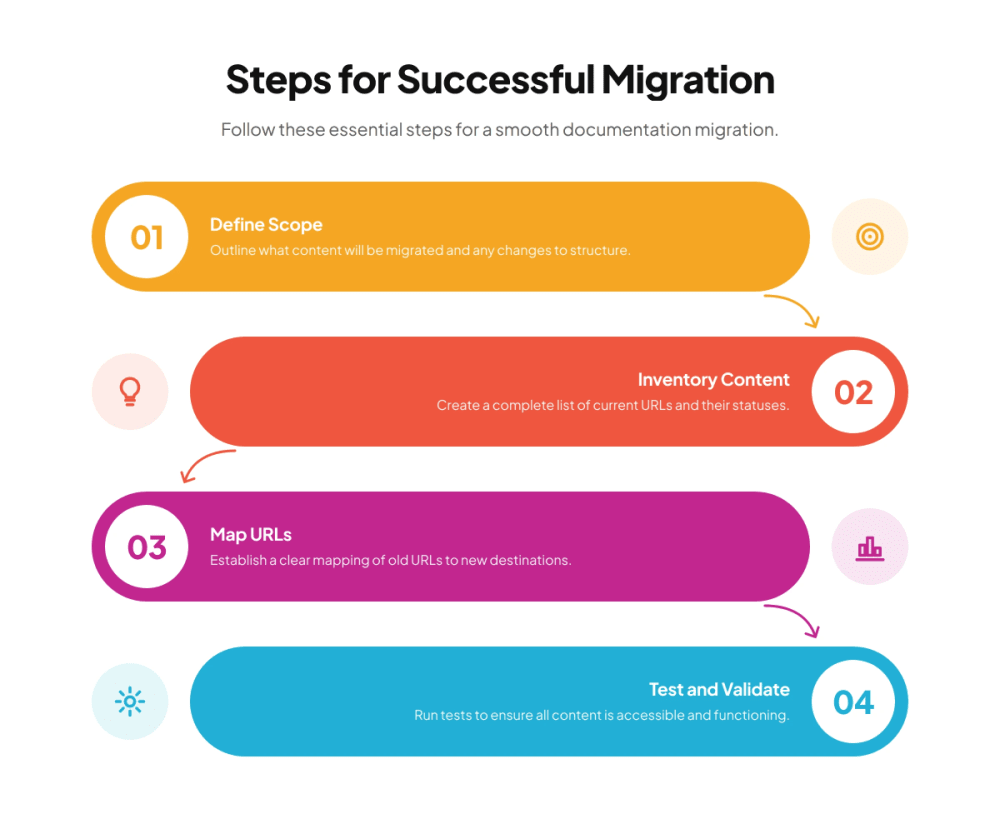
A reliable migration preserves reader paths first. Inventory the source, define the destination, map every important URL, test representative content, launch through a runbook, and monitor the result. Improve wording and design after the team has proved that customers, search systems, and support workflows can still reach the right information.
The finished deliverable is more than a copied documentation set. It is an auditable map from old URLs to owned destinations, supported by tests, operational monitoring, and a rollback decision. That is what turns a platform change into a controlled documentation release.
Subscribe to Our Newsletter
Stay up to date with our latest news and updates.