
Made withHyperBlog
Can the team validate the affected pages and approve the proposed edit? |
Mintlify | Developers and browser editors need one Git workflow | Can both groups branch, review, and resolve competing edits? |
ReadMe | API onboarding is the core reader journey | Can a developer reach and use the correct reference and example? |
Docusaurus | Engineering wants control of the site and deployment | Who maintains builds, dependencies, search, and publishing? |
Document360 | Articles need defined editorial stages and assignees | Can the required review stages and restrictions be enforced? |
Docusaurus Cost Guide for SaaS Teams: Hosting, Search, and Maintenance

Best ReadMe Alternatives for Product and API Documentation
GitBook vs Mintlify for SaaS Teams: Editing, AI, and Total Cost
The best GitBook alternatives depend on what your team needs to change: Hyperdocs for a product-change-to-documentation workflow, Mintlify for managed Git-based developer docs, ReadMe for an API-centered developer experience, Docusaurus for an engineering-owned site, and Document360 for structured editorial governance. Start with the constraint GitBook is failing to meet, then test two candidates against the same content and release task.
Switching platforms creates work beyond importing pages. Your writers must edit comfortably, reviewers must control publication, and customers must still reach the right instructions. A cheaper subscription can disappoint if a routine support correction now needs engineering intervention. A polished editor can disappoint if release changes still arrive without an owner.
This is a source-based editorial shortlist for public SaaS product documentation, checked against official vendor documentation and pricing on October 23, 2026. It covers five different operating models. The recommendations describe documented capabilities and evaluation questions; they are not hands-on test results, performance benchmarks, or a numerical ranking.
Publisher disclosure: Hyperdocs publishes this guide and is included as a candidate. Muthukumar, Hyperdocs co-founder, is the author. Apply the same migration and review tests to Hyperdocs as to every other option. Plan details can change, so confirm your required configuration before committing.
GitBook already combines a block-based visual editor with two-way GitHub or GitLab sync. Its current documentation also describes an Agent that writes and edits content, works through change requests, and proposes changes using connected context. Some gap-detection functionality is labeled beta. An evaluation that assumes GitBook has no AI maintenance workflow starts from an outdated premise.
Source check: GitBook Agent capabilities and current limitations
Write a specific switching requirement: a support writer must correct a guide without a developer; a product release must create a reviewable documentation change; an API customer must try a request; or the team must own deployment. Ask GitBook to demonstrate the same requirement first. Keeping a working setup can be the sensible decision when the gap is configuration, training, or an unused feature.
For broader requirements and scorecard design, use the SaaS documentation tool evaluation guide. Keep this shortlist focused on which replacement operating model deserves a pilot.
SaaS documentation tool evaluation guide
Candidate | Consider it when | Critical pilot question |
Hyperdocs | Product changes should lead to documentation drafts |
These are starting points for a shortlist. Multiple products can satisfy the same need, and the deciding factor may be your content format, review policy, deployment requirements, or contributor mix.
Hyperdocs is a candidate when the switching requirement centers on connecting public documentation maintenance to GitHub changes. Its published workflow describes analyzing code changes, identifying documentation impact, preparing update drafts, and keeping review and publication with the team. It also supports product docs, help centers, API documentation, and changelogs.
Hyperdocs GitHub Sync workflow
In the pilot, select a real, non-sensitive change that alters a documented customer task. Inspect the proposed affected pages and the resulting draft. Check omissions, unnecessary edits, terminology, and whether the reviewer has enough evidence to approve it. A draft that reads fluently still needs verification against the actual product.
Check the repository scope, credit allowance, contributor roles, and plan requirements for the workflow you need. Do not assume Hyperdocs provides the same bidirectional file-editing model as GitBook because both connect to GitHub. Confirm source-of-truth and export behavior with representative content before migrating.
Compare Hyperdocs and GitBook
See how the platforms compare on documentation workflows, team collaboration, and pricing before choosing your next step.
Mintlify is a candidate when the team wants repository-based documentation with a browser editing path. Its editor documentation maps saving, branching, pull requests, merging, and publishing to Git operations. External repository changes sync into the editor, with conflicts surfaced when edits overlap.
Source check: Mintlify branching, publishing, and Git sync
Mintlify also documents automations triggered by code changes, schedules, and connected events. These capabilities require Pro or Enterprise. Evaluate the configured trigger, context repositories, and review mode instead of assuming that repository synchronization alone maintains product accuracy.
Mintlify automation triggers and plan requirements
Ask a product writer to make a browser edit while an engineer changes the same sample in Git. Confirm the conflict and approval path in your chosen plan. This option deserves consideration when Git remains central to publishing; the pilot must establish how much configuration ownership stays with engineering.
ReadMe is a candidate when moving from GitBook must improve API onboarding, interactive reference, and developer usage context. Its current offering includes an interactive API reference, Markdown guides, and usage metrics. Its documentation describes optional bidirectional sync with GitHub, GitLab, or Bitbucket.
ReadMe bidirectional sync documentation
Test one complete journey: find authentication guidance, understand required permissions, locate an endpoint, and use a representative example against your sandbox. Include a failure case so the team sees whether troubleshooting guidance is reachable. Verify the documented behavior and actual rendered result separately.
ReadMe's Starter, Pro, and Enterprise packages have different collaboration and review allowances. Its pricing page lists branching and reviews under Pro, and Ask AI as an add-on. Confirm the needed admin seats, versions, and AI package. API specialization is useful only if the surrounding product guides and writer workflow also fit.
ReadMe plans and current feature packaging
Docusaurus is an open-source static-site generator built around React and Markdown or MDX. It supports documentation features including versioning and localization. Its deployment documentation makes the operating boundary clear: Docusaurus produces static files, and your team chooses how to host them.
Source check: Docusaurus deployment responsibilities
Consider it when control over source files, components, and deployment outweighs the convenience of a managed editorial workspace. Put a writer and an engineer through the same correction task used for the hosted candidates. Measure the actual handoffs and inspect the rendered page before approval.
The software uses the MIT license. Budget separately for hosting, search, CI, dependency updates, and the people maintaining the site. You can build additional editorial tooling, but its setup and upkeep become part of the project. This is a deliberate ownership choice for teams prepared to operate the documentation stack.
Docusaurus source and MIT license
Document360 is a candidate when leaving GitBook should give a documentation program more explicit editorial stages. Its Workflow designer supports custom statuses, assignees, and read-only restrictions. Its knowledge-base platform includes Markdown and an advanced visual editor.
Source check: Document360 workflow stages and restrictions
Model one article moving from draft through subject-matter review to publication. Test who can change content at each stage, how corrections return to the writer, and how ownership remains visible. Include a routine support update and a higher-risk technical update so the review process handles both.
Its public pricing page currently requests a customized quote. Confirm the needed workspaces, contributors, languages, AI features, and approval configuration in that quote. If a repository is your primary writing surface, separately validate the required integration; an API or import feature does not establish an equivalent two-way Git workflow.
Document360 current pricing and platform scope
Use the same assumptions for every candidate: documentation sites, active contributors, reviewer roles, languages, AI usage, and required support. Include implementation and ongoing maintenance. Compare annual commitments with annual commitments and monthly plans with monthly plans.
As checked October 23, GitBook lists Essential at $65 per site per month and Ultimate at $249 under annual billing, plus user charges. Mintlify lists a free Starter and Pro at $450 per month billed annually or $540 billed monthly. These starting figures do not establish the cost of your specific team.
GitBook current pricing and calculator
Mintlify current plans and credit terms
Hyperdocs lists a 14-day exploration period and paid plans with member and credit allowances. ReadMe offers Starter and paid collaboration tiers; Document360 uses a customized quote. Verify the exact features you need on each current plan. Keep your worksheet attached to the purchasing decision so a later plan change is easy to assess.
Hyperdocs current plans and allowances
Which workflow would your replacement need to improve?
What is the main reason you would evaluate a GitBook alternative?
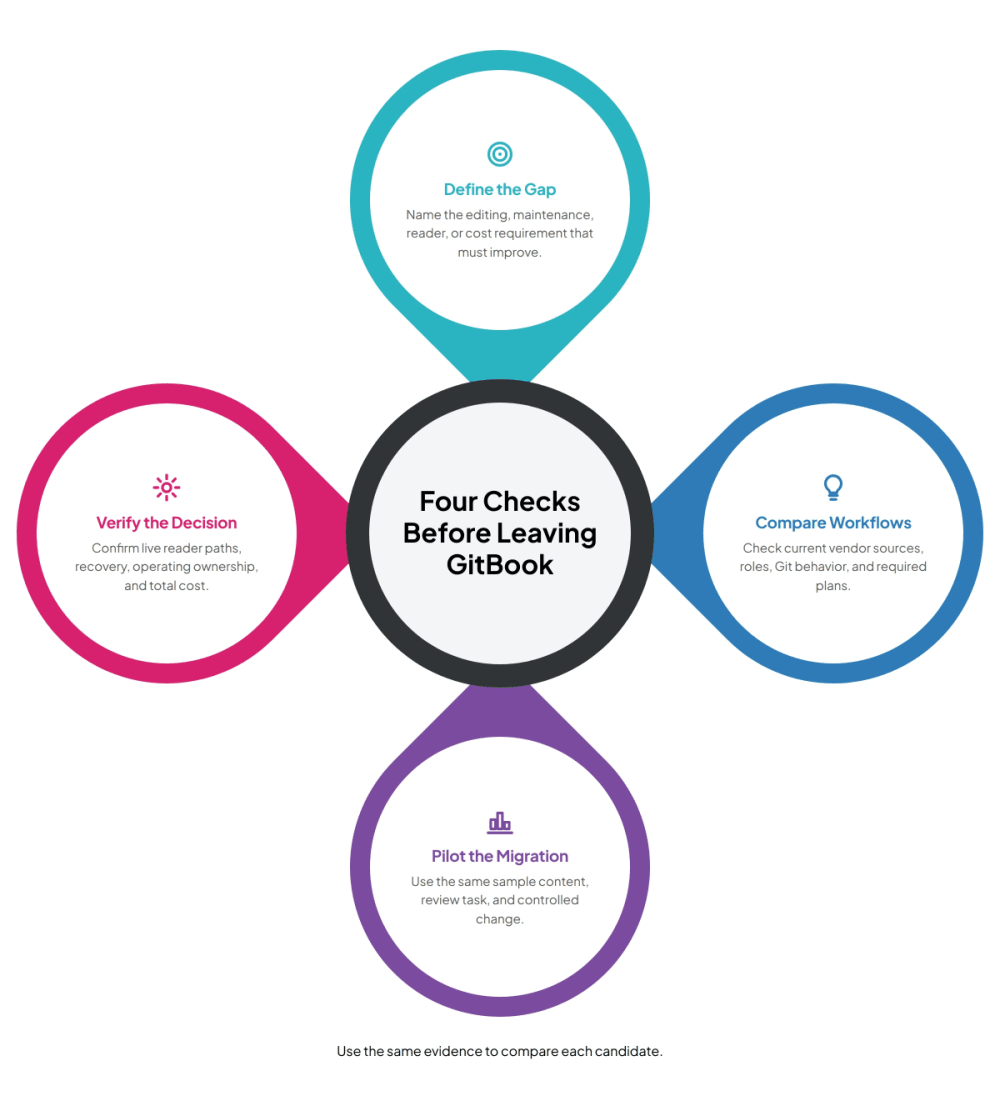
Give the two finalists the same representative content set: a setup guide, a deeply nested page, a code-heavy guide, an API reference sample, and a page with images and anchored links. Use an isolated evaluation area and approved non-sensitive material. Record the source revision so differences are explainable.
Inspect heading hierarchy, navigation, images, tables, code formatting, custom blocks, and internal links after import. Have a nontechnical writer correct a sentence and a technical reviewer approve a behavior change. Record any manual cleanup and repeat the test with your hardest content type.
Introduce a controlled change to the sample product instructions. Verify what signal the candidate receives, which pages it proposes changing, and how a reviewer accepts or rejects the output. Then inspect the published result as a reader. Test search, deep links, redirects, canonical URLs, and recovery from a bad edit.
Define pass criteria before the demo: critical content survives, required roles work, no unapproved changes go public, and priority reader paths remain usable. A migration pilot produces your own evidence. The platform migration checklist provides the detailed URL mapping, cutover, and rollback work once a finalist passes.
Documentation platform migration checklist
Choose the candidate whose operating model fixes the documented reason for leaving GitBook. Keep evidence of the tradeoffs and the work your team will still own. If product-change-driven drafts are the priority, compare the Hyperdocs workflow with your GitBook setup, then validate it with your own pilot.
Compare Hyperdocs with GitBook
Start with the operating requirement: Hyperdocs for product-change-driven drafts, Mintlify for managed Git-based docs, ReadMe for API onboarding, Docusaurus for an engineering-owned site, or Document360 for editorial stages. Validate the fit in a pilot.
Docusaurus has an MIT-licensed software package, with hosting and operations managed separately. Mintlify and ReadMe currently offer free entry plans. Check contributor, review, AI, and publishing requirements before treating any free option as a complete replacement.
Synchronization moves documentation changes between systems. Accuracy also depends on identifying product changes, finding affected pages, correcting instructions, and reviewing the result. Test those responsibilities separately.
Mintlify documents browser editing with branching and Git operations. ReadMe documents optional bidirectional repository sync. Confirm conflict handling, branch protection, and plan requirements against your team's workflow.
Use representative nested pages, images, code, tables, anchored links, and an API sample. Verify import fidelity, writer and reviewer roles, a controlled update, public reader paths, and recovery from a bad edit.
Price the same number of sites, contributors, reviewers, languages, and expected AI usage. Include required add-ons, migration cleanup, hosting where applicable, and ongoing maintenance. Use matching billing terms and current vendor quotes.
Subscribe to Our Newsletter
Stay up to date with our latest news and updates.
Can the team validate the affected pages and approve the proposed edit? |
Mintlify | Developers and browser editors need one Git workflow | Can both groups branch, review, and resolve competing edits? |
ReadMe | API onboarding is the core reader journey | Can a developer reach and use the correct reference and example? |
Docusaurus | Engineering wants control of the site and deployment | Who maintains builds, dependencies, search, and publishing? |
Document360 | Articles need defined editorial stages and assignees | Can the required review stages and restrictions be enforced? |