Answer Agent answer users.
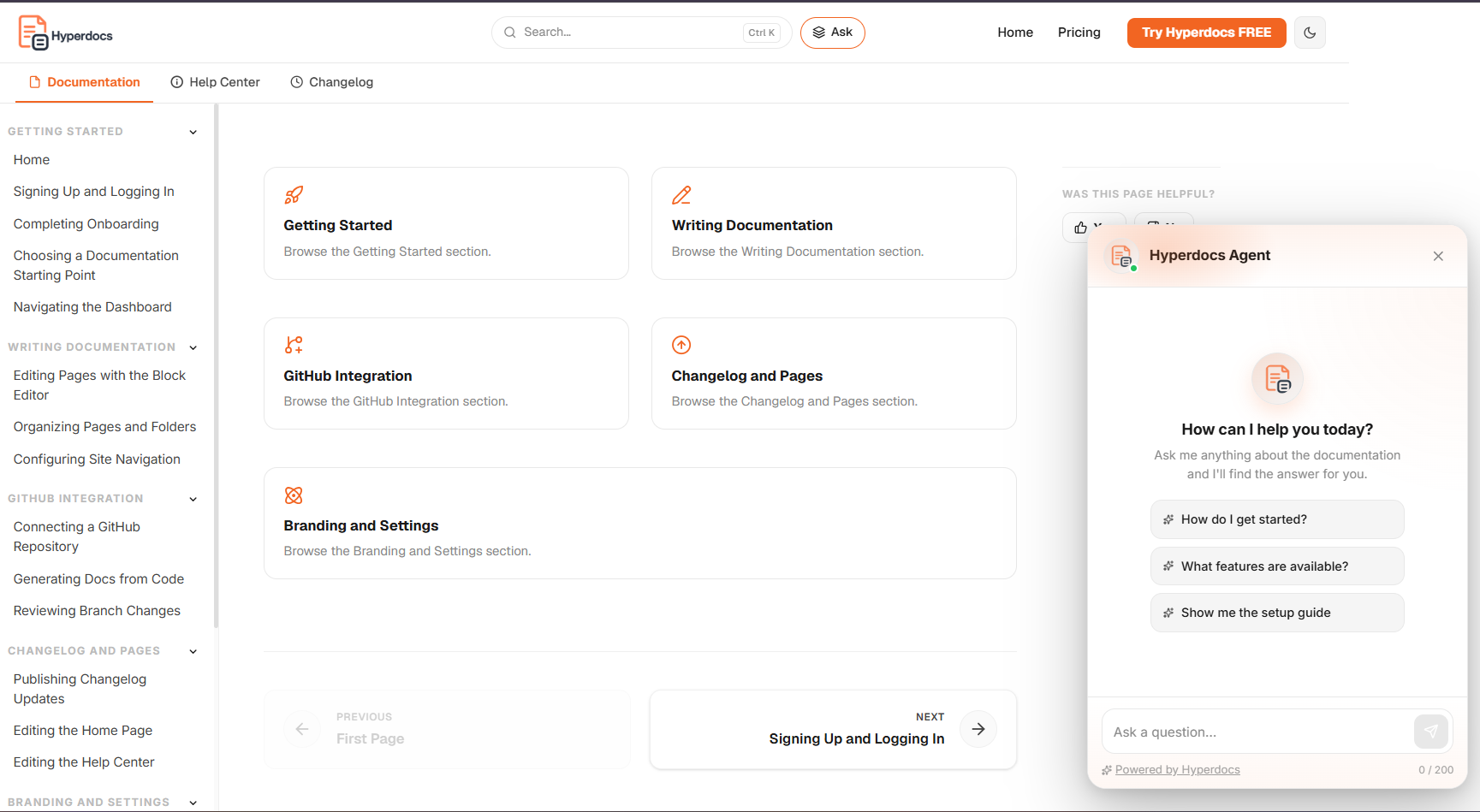
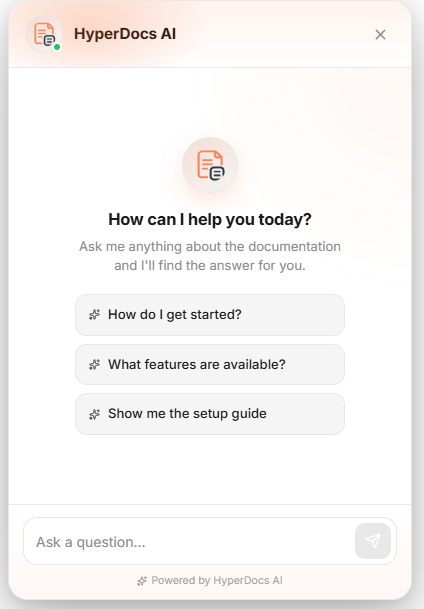
Answer Agent is the AI chat agent built into every Hyperdocs documentation page. Users ask questions in natural language and get answers grounded in your published documentation, with a path to your team when the docs do not cover a question.
From user question to accurate answer — in seconds
Answer Agent reads your Hyperdocs documentation and answers user questions directly — without leaving your docs or your product.
User asks a question
User types a question in natural language inside the Answer Agent widget — on a published Hyperdocs documentation page.
Answer Agent searches your docs
Answer Agent scans your Hyperdocs documentation in real time — finding the most relevant content to answer the question accurately.
User gets an instant answer
Answer Agent uses your published documentation to respond. If it cannot find a relevant answer, your fallback message points users to your team.
User gives feedback
Was this helpful? Users rate the answer — giving your team real insight into what's working and what needs improving in your docs.
Everything your AI documentation chat agent needs
Answer Agent is built for SaaS teams who want accurate, on-brand, fully controlled AI answers — without the risk of a generic chatbot giving wrong information.
Answers only from your docs
Answer Agent never generates answers outside your documentation content. Every response is sourced directly from your Hyperdocs pages — so users always get accurate information.
Instant responses — no waiting
Users get answers in seconds — not hours. No waiting for a support reply. No hunting through pages. Just ask and get the answer, right where they are.
Fully customisable widget
Set your own logo, agent name, and brand colours. Answer Agent looks and feels like part of your product — not a third-party chatbot bolted on.
Smart fallback to support
When Answer Agent can't find an answer in your docs, it shows your custom fallback message — directing users to your support email instead of leaving them stuck.
Built-in feedback loop
Every Answer Agent response has a "was this helpful?" rating — the same feedback system on your doc pages. Know exactly which answers are working and which need improving.
Available on your docs site
Answer Agent appears on published Hyperdocs documentation pages, so visitors can ask a question while they read.
Answer Agent works across your entire documentation ecosystem
One AI chat agent. Active everywhere your users look for help.
Product Docs
Users reading your product guides can ask questions and get instant answers without switching pages.
Help Center
Your help center becomes conversational — users describe their problem and get the exact article or answer they need.
API Docs
Developers ask technical questions about your API and get precise, accurate answers pulled from your API reference.
Changelog
Users ask what changed in the latest release — Answer Agent responds from your changelog and release notes instantly.
Make Answer Agent yours — not ours
Every SaaS product is different. Answer Agent adapts to your brand, your tone, and your support workflow.
Your logo. Your name. Your brand.
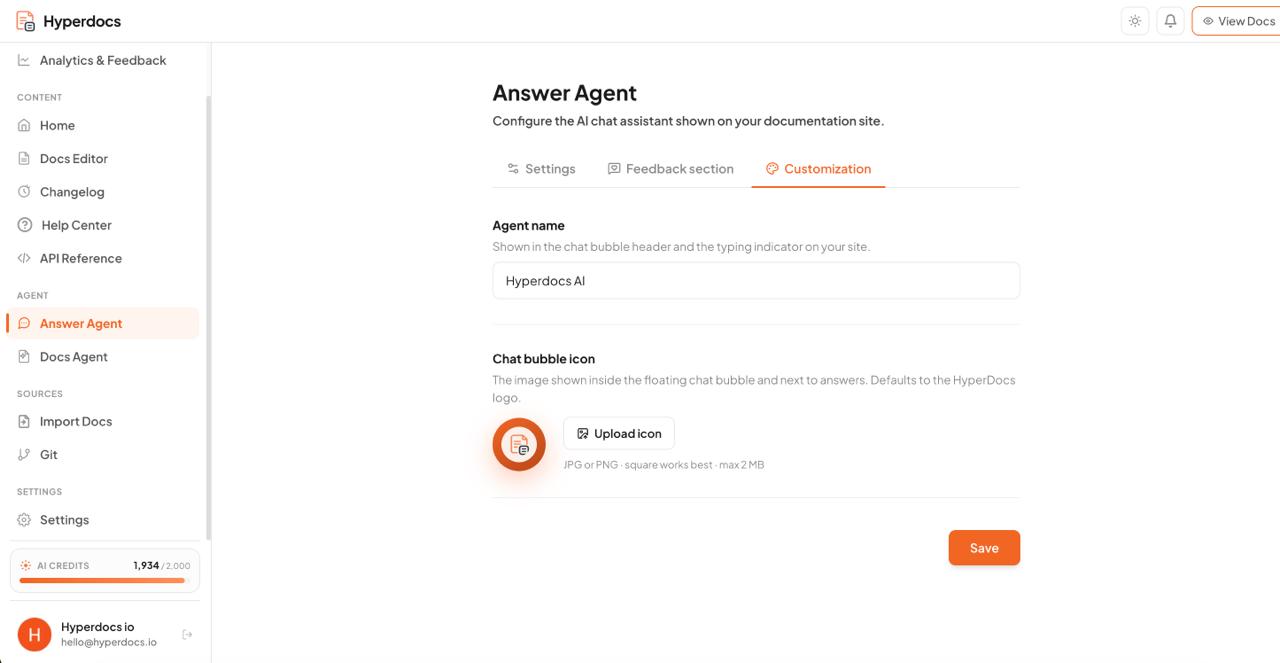
Upload your product logo and set a custom name for Answer Agent — so it looks and feels like part of your product, not a generic chatbot. Users see your brand. Not ours.
- Upload your own widget logo
- Set a custom agent name (e.g. "Aria", "HelpBot", "Support")
- Matches your documentation brand colours automatically
- Users see your product identity — not Hyperdocs
When Answer Agent doesn't know — it handles it gracefully.
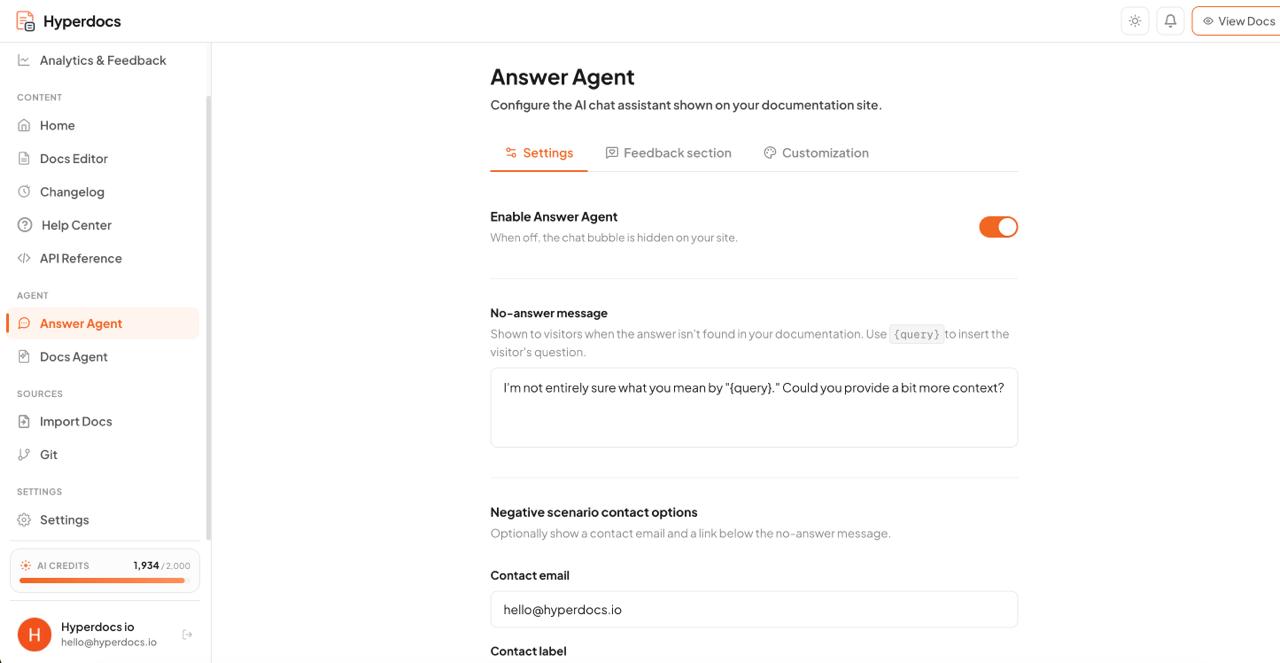
Set a custom message for when Answer Agent can't find an answer in your documentation. Point users to your support email, your team, or any resource — so no user is ever left without a next step.
- Write your own fallback message
- Include your support email directly
- Honest AI — never guesses outside your docs
- Users always have a clear next step
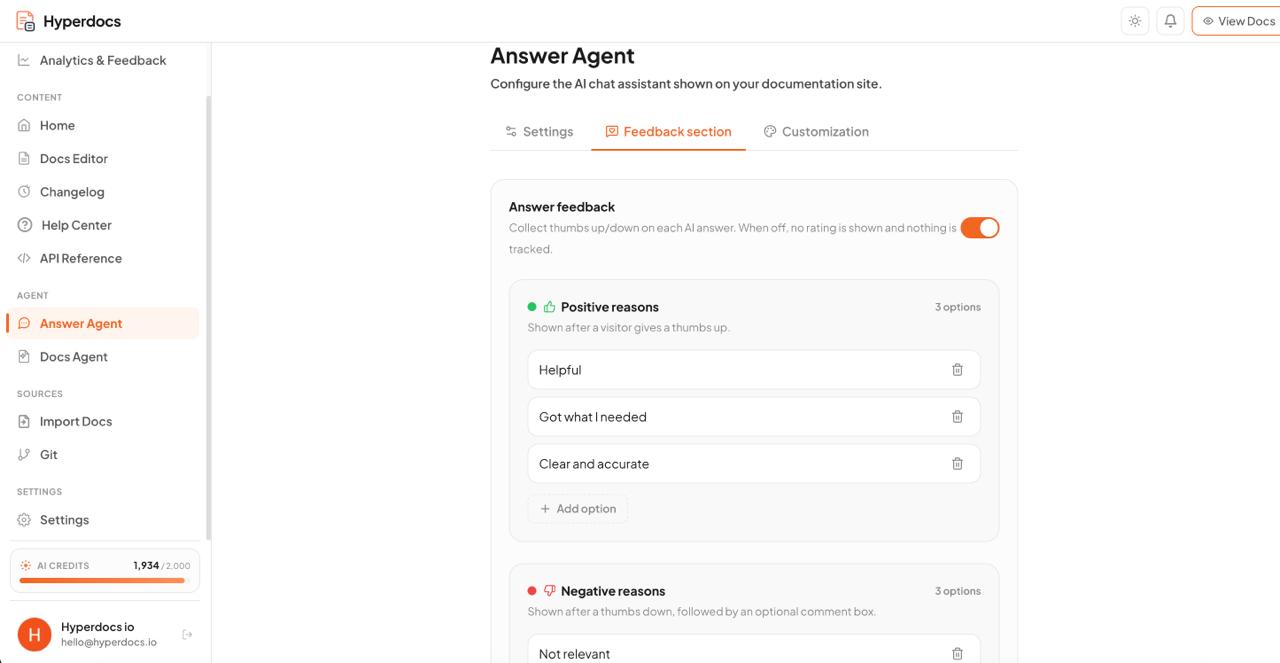
Know exactly what your users need — and what your docs are missing.
Every Answer Agent response includes a feedback prompt — "was this helpful?" Users rate the answer. Your team sees which questions are being answered well and which need better documentation coverage.
- Thumbs up / thumbs down on every answer
- Same feedback system as your doc pages
- Identify documentation gaps before they become support tickets
- Prioritise doc improvements based on real user signals
Documentation help on every published docs page.
The Answer Agent widget appears on published Hyperdocs documentation pages, where readers can ask questions and follow a link to support when they need more help.
- Let readers ask questions on your docs site
- Answer questions using your existing Hyperdocs content
- Offer help where visitors read your documentation
- Set a fallback link to your support team
See the cost of repeat questions.
Answer Agent helps customers work through questions and follow-ups in one chat, while your team handles cases that need a person.
Estimate how many tickets search and Answer Agent could handle, then compare the remaining support cost with today's human support cost.
Estimate your support savings Your inputs shape the estimate. Fewer tickets do not automatically reduce payroll.Start deflecting support tickets today
Answer Agent can be explored with Free's one-time credits. Paid plans include monthly AI credits for ongoing use. See current credit limits on the pricing page.
Answer Agent handles all kinds of questions
From simple billing queries to complex API configurations, Answer Agent understands your docs and answers users accurately.
Setup & Installation
"How do I install the Hyperdocs SDK in my React project?" or "How do I configure the API token?"
Troubleshooting
"Why am I getting a 403 Forbidden error?" or "Why does my sync fail with GitBook?"
Billing & Pricing
"How do I upgrade to the Pro plan?" or "Do you offer discounts for open-source projects?"
API & Webhooks
"How do I set up a webhook receiver?" or "What are the headers required for authentication?"
Account Settings
"How do I invite my team members?" or "Where do I configure my custom domain?"
Product Features
"Does Hyperdocs support search indexing?" or "Can I export my docs to PDF?"
Custom Domains
"How do I set up my custom domain?" or "How do I configure DNS records for Cloudflare?"
Answer Agent vs generic AI chatbots vs no AI
Not all AI chat agents are built the same. Here's what makes Answer Agent different from a generic chatbot.
Grounded in your published documentation
May generate answers outside your content
Only your Hyperdocs content — never outside it
No separate tool or subscription
Separate tool, separate subscription
Usage follows your plan's AI credit limits
Looks like your product
Basic branding on higher plans
Your logo, your name, your brand
Know what's working
Varies by platform and plan
Was this helpful? on every response
Help visitors while they read
Depends on the platform
Available on your Hyperdocs documentation site
No dead ends for users
Depends on configuration
Your message, your email, always a next step
GitHub Sync keeps answers accurate
Requires manual retraining or updates
GitHub Sync updates docs → Answer Agent stays accurate
Questions about Answer Agent
What is Answer Agent?
Answer Agent is an AI chat agent built into every Hyperdocs documentation page. It sits as a widget in the bottom right of your docs, help center, API docs, and changelog — and answers user questions instantly based only on your documentation content. Embedding Answer Agent in an external website or SaaS product is not available today.
Can Answer Agent give wrong or hallucinated answers?
Answer Agent uses your published Hyperdocs documentation to generate responses. Answers can still be incomplete or incorrect. When it cannot find a relevant answer, your custom fallback message can direct users to your support team.
Can I embed Answer Agent inside my own SaaS product?
No. Answer Agent currently appears on your published Hyperdocs documentation site. Embedding it in an external website or SaaS product is not available.
How is Answer Agent different from a generic AI chatbot?
Generic AI chatbots can generate answers from anywhere, including outside your product documentation, which creates a risk of wrong or misleading responses. Answer Agent answers from your Hyperdocs documentation, with usage governed by your plan's AI credit limits, and stays accurate as your docs are updated through GitHub Sync.
Does Answer Agent cost extra?
Answer Agent can be explored with Free's 2,000 one-time Explore Credits. Paid plans include monthly AI credits for ongoing use. It is built into Hyperdocs rather than sold as a separate subscription. See current credit limits on the pricing page.
Can I customise how Answer Agent looks and responds?
Yes. You can set a custom logo, a custom agent name, and a custom fallback message for when Answer Agent cannot find an answer in your docs. This makes it look and feel like part of your product rather than a third-party tool.
Does Answer Agent work without Hyperdocs?
No. Answer Agent is built exclusively for Hyperdocs-powered documentation. It works by reading your Hyperdocs documentation content in real time to generate accurate answers. It is not available as a standalone tool.
How does Answer Agent stay accurate as my product changes?
Answer Agent reads from your live Hyperdocs documentation. When your documentation is updated — through GitHub Sync or manual edits — Answer Agent automatically reflects those changes. Your answers stay accurate as your product evolves.
Give your users instant answers
Deploy Answer Agent in minutes. Deflect support tickets, improve user experience, and make your documentation interactive.